January 8th, 2026
Task Enhancements
Subtasks can now be added to any task

File attachments are supported when creating a task

Form Improvements
Success page customization: choose from icons or provide your own image URL

New option to disable animations on embedded forms

Automation
Deal stage-based triggers now support stage selection within pipelines

Client Portal
Projects module can now be shown or hidden in the client portal

Comments & Notes
URLs in comments are now clickable

Rich-text editor added to notes

Quick Stage Updates
Right-click menu: Stage selection added directly to the context menu for companies and contacts, with stage color, icon, and a checkmark indicator for the current stage. This makes updating stages much quicker from lists.

December 31st, 2025
We’ve just shipped several quality-of-life improvements across the platform to make your daily workflows faster and more intuitive:
Quick Actions Menu
You’ll now find a + button at the top to quickly add tasks, meetings, contacts, companies, invoices, deals, and more.
→ Fully customizable based on what you use most.

Subject Field in Invoices
You can now add a subject line to your invoices — helpful for context, clarity, and organization.

Revamped Client Portal Customization
New, simplified UI

Dynamic Naming for Quotations & Invoices
Set up dynamic document names using smart placeholders — personalize your files at scale.

Enhanced Entity Picker in Tasks
Search across all entities
Use keyboard shortcuts to move faster when linking tasks to deals, invoices, jobs, etc.

Contact First & Last Name Variables in Emails
Use {{contact.first_name}} and {{contact.last_name}} directly in your emails — for more personalized outreach and follow-ups.

New “Meeting” Button in All Entities
You no longer need to open a task to schedule a meeting.
→ Just click “Meeting” directly from any entity (deal, company, invoice, etc.).

Export & Copy Form Responses
You can now download form responses as Word documents or copy the full response in one click — great for sharing, printing, or saving offline.

December 26th, 2025
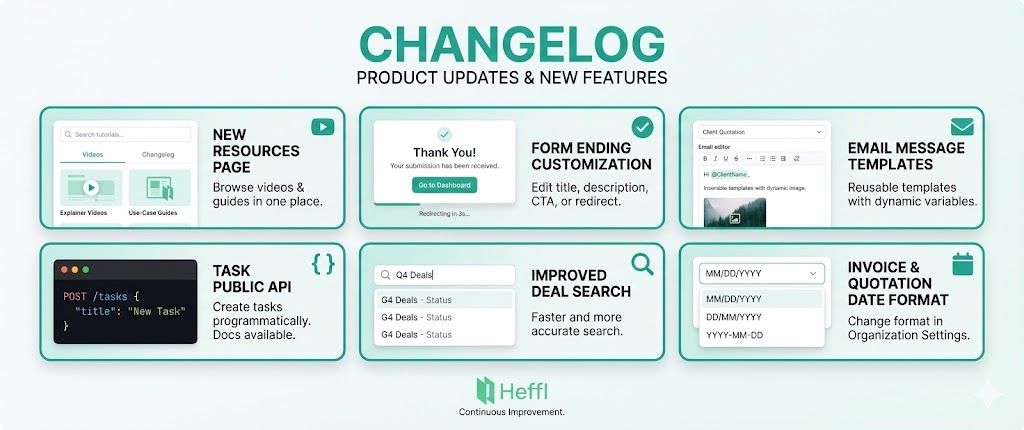
Resources Page
A new Resources page helps you quickly find helpful videos, tutorials, and feature walkthroughs.
→ Browse explainer videos and use-case guides in one place
→ Videos are organized for easier discovery
→ Includes a Changelog tab so you can view product updates without leaving the app

Form Ending Page Customization
Forms now support customizable submission endings.
→ Edit the ending page title and description
→ Choose a CTA button or automatically redirect to a success URL
→ Set a redirect delay so users clearly see the confirmation first
→ Improves clarity, trust, and flexibility after submission

Email Message Templates
Create and manage reusable email templates for consistent communication.
→ Design templates for quotations, invoices, leads, deals, and clients
→ Insert dynamic variables with @mentions
→ Add images and rich content for better presentation
→ Saves time and keeps branding consistent

Task Public API
Now available to create tasks programmatically.
→ Docs: https://heffl.com/api-docs#tag/tasks/post/tasks

Improved Deal Search
Search is faster and more accurate for deals.
Invoice and Quotation Date Format
You can change the date format in Organization Settings → General.
→ This applies to invoices and quotations.

December 17th, 2025
slug: automation-enhancements-and-field-service-improvements issueNo: "003" date: 2025-12-12 description: > This release brings significant enhancements to automations with templates and duplicate functionality, improved deal management with rotten deals tracking, comprehensive form improvements, new field service reporting capabilities, and various performance optimizations across the platform.
🚀 Features
Automation Templates
Browse and use pre-built automation templates to quickly set up common workflows. Templates are available in the automations section with preview functionality.
Duplicate Automation Functionality
Duplicate existing automations with a single click. All automation steps and configurations are preserved, making it easy to create variations of workflows.
Rotten Deals Tracking
Visual indicators for deals that haven't been updated within their configured rotting period. Rotten deals appear in kanban and mobile views with badges showing days of inactivity.
Form Display Settings
New form display settings to control logo visibility, title and description display, and progress bar visibility. Configure these options in Form Settings.
Field Staff Work Report
New comprehensive report showing field service staff work hours, service breakdowns, and performance metrics. Filter by date range and staff members.
Quotation Automation Triggers
Automation triggers for quotation lifecycle events: created, updated, and deleted.
Lead & Deal Stage Changed Triggers
Automation triggers fired when leads or deals move between stages, with support for stageId and dealPipelineId inputs.
Lead Creation from Webhook Trigger
Automatically create leads from webhook triggers to integrate external systems with your CRM.
Create Task Action in Automations
New automation action to automatically create tasks as part of workflows.
Rich Text Editor for Automation Email Body
Rich text editor added to automation email bodies, supporting formatting, links, and enhanced content editing.
iOS App Back on App Store
The iOS mobile app is available again on the App Store, enabling CRM access and management on the go.
Duplicate Leads Functionality
Optional setting to enable lead duplication. Duplicate leads with a single click while preserving all data, custom fields, and associations.
🔧 Improvements
Schedule Details Enhancement
Schedule details now use structured data selection for improved performance and better query handling in the schedule details modal.
Integration List Optimization
Optimized integration list with search functionality for improved performance and user experience.
🐞 Bug Fixes
Various Bug Fixes
Fixed multiple issues across the platform, including form handling problems, automation trigger issues, lead creation fixes, and several UI improvements.
December 17th, 2025
slug: api-enhancements-and-integration-improvements issueNo: "002" date: 2025-11-25 description: > This release includes significant API enhancements, email integration improvements, notification system upgrades, new integrations, code refactoring for better maintainability, and various bug fixes across the platform.
🚀 Features
Public API Update Endpoints
Added update endpoints for clients and leads.
Form Response Webhook Trigger
Webhook trigger for form responses.
German & Romanian Language Support in Client Portal
Added German and Romanian language support to the client portal.
🔧 Improvements
Email Integration Encoding Fixes
Improved email sending for Gmail, Outlook, and Zoho Mail integrations.
🐞 Bug Fixes
Fixed Email Subject Encoding
Fixed email subject line encoding for Gmail integration to properly handle non-ASCII characters and special characters in email subjects.
November 9th, 2025
Billing and documents
Added inclusive and exclusive tax options, added percent discount option
Refined how line items are calculated and displayed across quotes/invoices, ensuring accurate totals with discounts and tax, and cleaner currency/date formatting. This makes document totals more reliable and easier to read.
Client Portal
Product descriptions in the client portal now support links and render rich text properly, so customers can click through to referenced pages directly from product details. Visibility is restricted to items marked for the portal.
Improved client portal authentication and routing: tokens now carry client/contact IDs, unauthorized states trigger a proper login redirect, and requests include the client slug for correct scoping. This strengthens security and reduces login friction.
Timesheets
Added the ability to delete timesheets (with confirmation prompts) from the project timesheets list and details pages. Successful and failed actions show clear toasts.
Webtabs
Added web tabs option, now you can add you google sheets, or any other softwares you use directly inside heffl.
October 20th, 2025
Added commenting to tasks
Improved bulk import functionality for Clients, Contacts, Leads, Products
Bulk delete for clients and contacts
Fixed dark-mode issues
Added option to update completed at date
October 17th, 2025

Duplicate Products: Right-click any product to instantly create a copy with all details (name, prices, SKU, tax, descriptions).
Quick Edits: Modify the duplicated product as needed — perfect for variations.

Default Tax Rate: Set a tax rate per product to auto-apply in quotes, invoices, and sales orders.
Smart Automation: Tax rate appears automatically but can still be changed manually.